
How to set up your custom irl.community username for Bluesky
If you are a Twitch Subscriber, or level 20 or above (Resident rank or above) in my Discord server, you are eligible to receive a custom Bluesky username to represent your membership in the IRL Community!
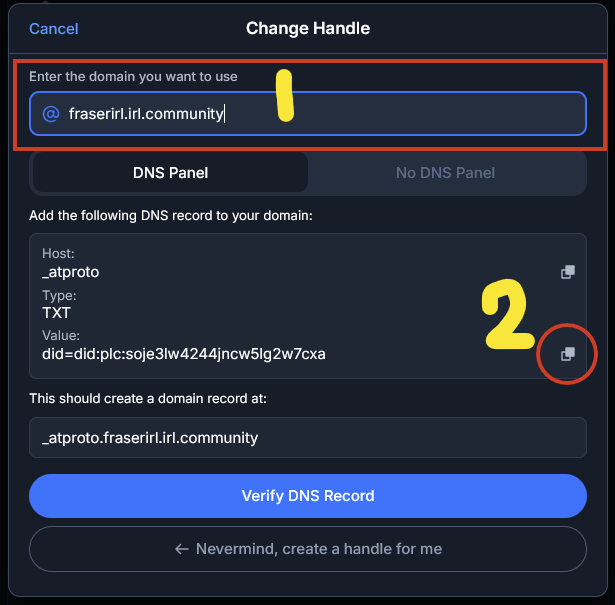
First of all, go to your Bluesky settings and click on “Handle”.
Then, click on “I have my own domain”.
Type in your chosen username (i.e. fraserirl.irl.community). (1)
Then, click on the “Copy Domain Value” button. (2)
Now, head to the IRL Community Discord server and type the below command in #bot-chat:
/bluesky claimThis kicks off the Bluesky username claim process from the bot.
You will need to provide the following information:
Your desired username, without .irl.community.
For example, if I typed “fraserirl.irl.community” into Bluesky earlier, I’d type:
fraserirl
Your Bluesky DID.
Paste the value you got when you clicked on “Copy Domain Value” earlier.
Your form should now look something like this.
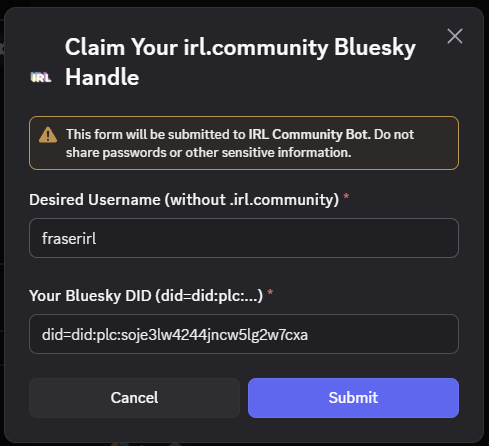
Click Submit. If all has gone to plan, you should receive a success message!
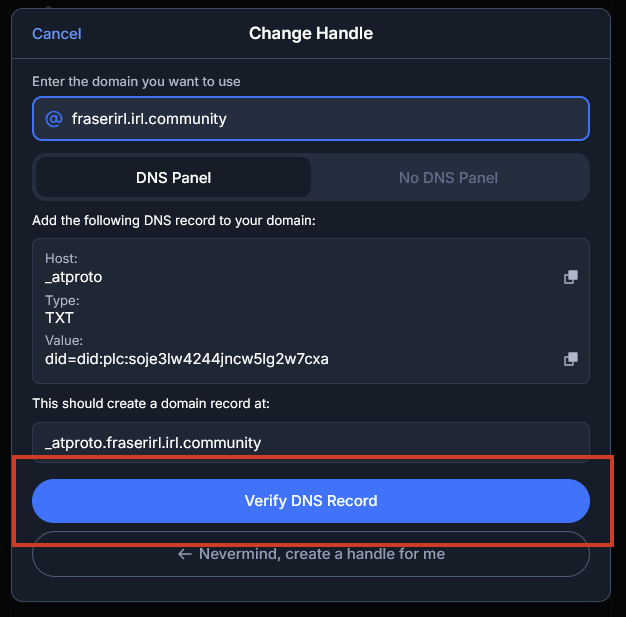
After the success message, simply click on “Verify DNS Record” on the Bluesky page!
As with every perk there is a “small print” – please see perk conditions below:
- (FOR SUBS) This perk can be revoked as part of ending your Twitch sub, with a grace period (I’m not gonna snipe it the second you unsub dw, there will be a warning!).
- This perk can and will be revoked if you leave the Discord community.
- This perk can and will be revoked if you’re found to be posting completely inappropriate content with the handle that can make the community look bad (you know what I mean, not enforcing discord moderation as such as it’s your own account, but thinking average Elon-Twitter level shit, as well as the common sense things that just aren’t acceptable etc).